

Python QuickStart
Prerequisites
- Python 3.8+: run
python3 --versionin a terminal to check the installed version. - A running SITL instance (Gazebo, jMAVSim, …). A quick way to run a headless Gazebo SITL instance using docker is documented here.
Install
MAVSDK is distributed through PyPI and can be installed with pip, ideally in a venv:
pip install mavsdkThe package wraps the MAVSDK C++ library, which it ships with, so there is nothing else to install. Wheels are available for:
- Linux x86_64 and aarch64 (64-bit Raspberry Pi OS included)
- macOS x86_64 and arm64
- Windows x86, x64 and arm64
TIP
There are no wheels for 32-bit ARM Linux (armv6/armv7). On those, use the gRPC-based mavsdk-grpc instead, or switch to a 64-bit OS.
INFO
Coming from mavsdk 3.x or earlier? That was the gRPC-based MAVSDK-Python, which has a different API. See Migrating from MAVSDK-Python.
The package provides two interfaces to the same functionality:
mavsdk.asyncio: an asyncio API, used in this guide.mavsdk: a synchronous API using threads and callbacks, shown further below.
Run SITL
It is always good to make sure that SITL works before trying to connect MAVSDK to it. One way is to run the following commands in the pxh> prompt when SITL is running:
commander takeoff
commander land
The simulated drone should takeoff and land. If it doesn't, it may mean that SITL is not ready, or that there is a problem.
Take off from MAVSDK
When we know that the simulator is ready, we can start an interactive Python shell that supports await:
python3 -m asyncioImport MAVSDK into the environment by entering:
from mavsdk.asyncio import Mavsdk, Configuration, ComponentType
from mavsdk.asyncio.plugins.action import ActionAsync
We then create a Mavsdk instance, configured as a ground station, and connect it to the port SITL sends MAVLink to:
mavsdk = Mavsdk(Configuration.create_with_component_type(ComponentType.GROUND_STATION))
await mavsdk.add_any_connection("udpin://0.0.0.0:14540")
MAVSDK discovers the systems on that connection by itself. We wait up to 10 seconds for an autopilot to show up, and keep the resulting System as our handle to the drone:
drone = await mavsdk.first_autopilot(10.0)If no autopilot is found in time, drone is None, and it is worth checking that SITL is running and that the connection matches.
TIP
With more than one vehicle, subscribe to mavsdk.on_new_system() and look at await mavsdk.get_systems() instead.
Functionality is grouped into plugins, which are created for a system. To arm and take off, we use the Action plugin:
action = ActionAsync(drone)
await action.arm()
await action.takeoff()
If everything went well, your drone should take off. In the pxh console, you should see a log line like:
INFO [commander] Takeoff detectedIf running a graphical interface, you should see the drone taking off. Here is what it looks like in jMAVSim:
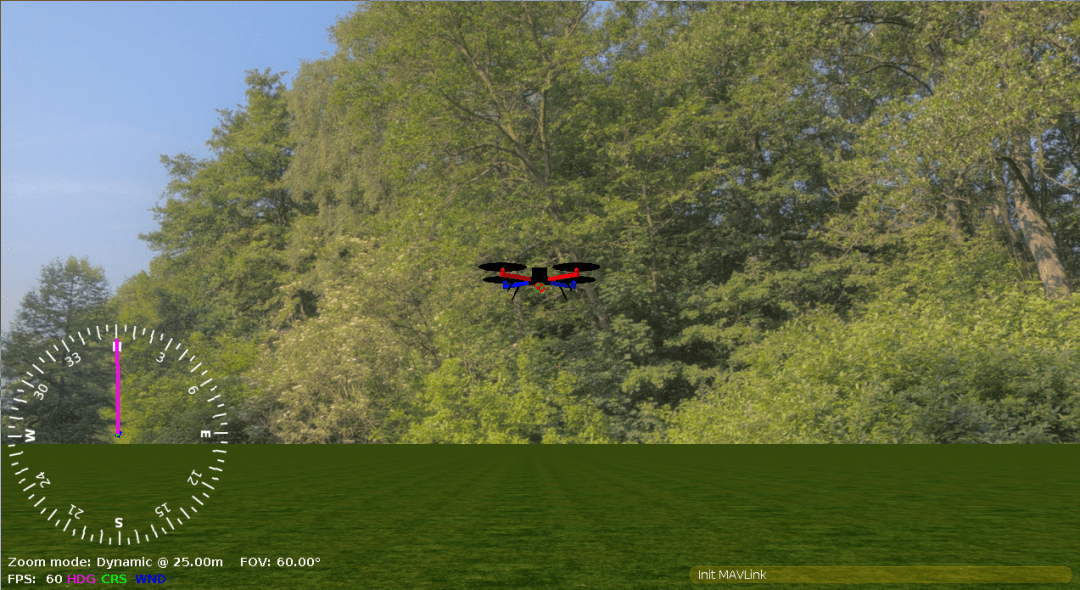
INFO
Make sure to send the takeoff() command within (at most) a few seconds of arm(); the drone will automatically disarm after a few seconds if it does not receive a command to takeoff.
If a command is rejected, for instance because you try to arm before the drone has a GPS fix, the call raises an exception instead of returning:
mavsdk.plugins.action.action.ActionError: COMMAND_DENIED; origin: arm(); params: ()This is not a bug: the vehicle refused the command. Each plugin raises its own error type, such as ActionError or MissionError, with the reason in its result attribute. They all derive from mavsdk.MavsdkError, so your code can handle them with try ... except:
from mavsdk.asyncio.plugins.action import ActionError

try:
    await action.arm()
except ActionError as error:
    print(f"Arming failed: {error.result.name}")
Now that the drone is flying, we can land:
await action.land()The same steps are in the takeoff_and_land.py example, which you can run as a script.
The synchronous API
The mavsdk package itself offers the same functionality without asyncio. Calls block until they are done, and subscriptions take callbacks, which are called from a MAVSDK thread. The plugins drop the Async suffix.
Taking off and landing looks like this:
import time

from mavsdk import Mavsdk, Configuration, ComponentType
from mavsdk.plugins.action import Action

mavsdk = Mavsdk(Configuration.create_with_component_type(ComponentType.GROUND_STATION))
mavsdk.add_any_connection("udpin://0.0.0.0:14540")

drone = mavsdk.first_autopilot(10.0)
if drone is None:
    raise SystemExit("No autopilot found")

action = Action(drone)
action.arm()
action.takeoff()
time.sleep(5)
action.land()
Examples
There are examples for the asyncio API and for the synchronous API in the repository, covering telemetry, missions, parameters, calibration, and cameras.
Next Steps
- Try the other examples.
- Browse the C++ API reference to get an overview of the functionality. The Python plugins mirror the C++ ones: the same plugins, with the same methods and types.